
From Suricata Alert to Reviewed Packet Evidence: UI, CLI, and API
 Oliver Ripka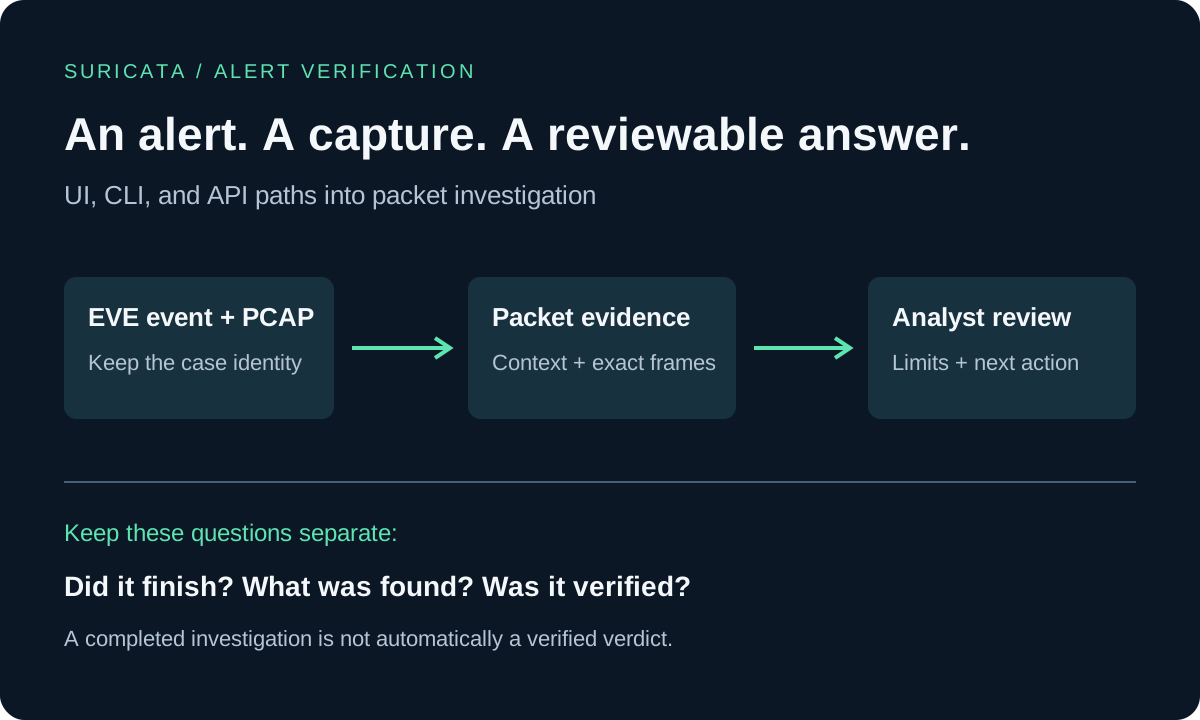
A Suricata alert arrives with a signature, a timestamp, and two endpoints. The analyst still needs to establish what happened around the match, whether the capture supports the concern, and what to do next.
Our Suricata alert-verification guide explains that investigation method. This article covers the tooling around it: submitting an existing alert through the interface, running the dedicated CLI, integrating the API, and retaining the result for review.
The walkthrough uses a hypothetical suspicious outbound connection. It does not claim a measured customer result. Keep the original alert and an authorized capture available throughout the workflow; the commands below expect files and credentials from your own deployment.
Start with one event and the matching capture
Save one Suricata EVE alert object as alert.json and the corresponding packet capture as incident.pcap. Supply one JSON event, not a complete multiline eve.json log. Preserve the original event in your case records even when submitting a smaller evidence package.
Suricata's EVE JSON documentation describes the event fields. Useful context includes the timestamp, endpoints, protocol, signature ID and revision, and flow identity. When available, retain the packet counter and capture-interface context as well. A sensor's flow identifier is not interchangeable with a Wireshark stream number.
Check the relationship between the files before launching an investigation. Does the capture include the alert's time window and observation point? Does it contain both directions? Do you have the relevant rule definition and revision? A signature name alone cannot establish all the conditions the detector evaluated.
PacketSafari accepts alert text or a structured event. The structured form preserves more identity and location information for automation. Supported event fields are normalized for the investigation; submitting an event does not guarantee that every vendor-specific field becomes model context.
Submit an existing alert in the interface
When uploading a capture, or starting an investigation on an existing capture, choose Verify an existing alert. Paste the alert text or the single EVE JSON object, then review the analysis plan, AI connection, model, privacy, and delivery settings before submitting.
This follows the existing investigation workflow. You can choose a Fast answer or a workflow with further verification and reporting. Treat the first answer as an assessment to review, even when it contains a structured verdict.
Alert assessment needs AI. Deterministic Triage can supply useful signals and facts, but Triage-only processing does not produce an AI adjudication of the supplied alert. A full IDS scan is a separate option; choosing alert verification does not automatically rerun every IDS rule.
For our example, the question is whether the recorded outbound exchange supports the reported concern. The investigation should identify the relevant packets, inspect the surrounding conversation, consider a benign explanation, and state what the capture cannot establish.
Run the same kind of submission from the CLI
Use a PacketSafari installation that includes the dedicated alert verify command. Configure the server and authenticate using your deployment's supported login or API-key setup. For automation, provision an appropriately scoped key and supply it through PACKETSAFARI_API_KEY from your secret manager. Do not put real keys in scripts, shared command transcripts, or tickets.
Submit the event and capture, saving the structured result:
packetsafari alert verify \
  --event alert.json \
  --external-alert-id soc-case-1842 \
  --format json \
  incident.pcap > assessment.json
The default is a bounded Fast answer. Progress is written to stderr, while the result goes to stdout. The example uses the account or organization's configured AI defaults. Where required, select an approved connection and model explicitly with --ai-auth-source-id and --model; those flags remain subject to your access and policy settings.
Keep the external alert reference stable when retrying the same submission. Retry handling is scoped to the caller and capture; a matching reference does not make unrelated files or another user's investigation interchangeable.
If the terminal disconnects, resume observing the existing job instead of submitting it again:
packetsafari alert verify --job-id JOB_ID
Replace JOB_ID with the returned verification job identifier. The command resumes observation of that job; it is not a request to repeat the investigation.
Example response: a benign scanner triggered the rule
The following are illustrative, abbreviated JSON responses, not results from real captures or customer incidents. They use the current response field names; frame numbers and report text are invented to explain the workflow. Additional identity, configuration, and progress fields are omitted.
In the benign example, the analyst has supplied an approved scanner identity and assessment window. The packets support a rejected probe, and that separate operational context explains why it was expected. The rule can match correctly while the alert is assessed as a false positive for malicious activity.
{
  "data": {
    "schema": "packetsafari.investigation-result/v1",
    "lifecycle": {
      "status": "completed",
      "terminal": true
    },
    "assessment": {
      "assessmentStatus": "completed",
      "securityVerdict": "benign",
      "alertVerdict": "false_positive",
      "truePositive": false,
      "ruleMatch": { "outcome": "matched" },
      "actionable": false,
      "recommendedDisposition": "close_benign",
      "confidence": "medium",
      "rationale": "Frames 1842 and 1848 show the probe and a rejection response. The supplied change record identifies the source as an approved scanner operating within its authorized window.",
      "packetFrames": [1842, 1848],
      "evidenceGaps": [
        "Scanner authorization comes from supplied operational context, not from the PCAP.",
        "The conclusion covers this exchange, not all activity from the source."
      ],
      "independentVerification": { "status": "not_run" },
      "source": "model_assessment"
    },
    "report": {
      "markdown": "## Finding\nThe signature matched an approved scanning probe. The captured response rejects the request.\n\n## Next action\nConfirm the scanner identity and change window before closing this case as benign. Retain the alert and packet references."
    }
  }
}
The value is the explanation behind the proposed closure: the matching exchange, the authorization context, and the limits are retained together. actionable: false means the assessment does not call for an incident response; it does not mean that a ticket was automatically closed or that analyst review is unnecessary.
Example response: the exchange supports malicious activity
In this separate hypothetical capture, an exploit request is followed by a response containing command output. That provides stronger evidence than the signature name alone and supports escalation for host investigation.
{
  "data": {
    "schema": "packetsafari.investigation-result/v1",
    "lifecycle": {
      "status": "completed",
      "terminal": true
    },
    "assessment": {
      "assessmentStatus": "completed",
      "securityVerdict": "malicious",
      "alertVerdict": "true_positive",
      "truePositive": true,
      "ruleMatch": { "outcome": "matched" },
      "actionable": true,
      "recommendedDisposition": "escalate",
      "confidence": "medium",
      "rationale": "Frame 920 contains the exploit request. Frames 927 and 928 contain the corresponding HTTP response with command output, supporting the assessment beyond the rule match.",
      "packetFrames": [920, 927, 928],
      "evidenceGaps": [
        "No endpoint telemetry was supplied to independently confirm the executing process.",
        "The capture does not establish persistence or the full scope of compromise."
      ],
      "independentVerification": { "status": "not_run" },
      "source": "model_assessment"
    },
    "report": {
      "markdown": "## Finding\nThe request and response support suspected successful exploitation, with command output visible in the response.\n\n## Next action\nEscalate with frames 920, 927, and 928. Correlate endpoint and application logs, and assess containment under the incident-response playbook."
    }
  }
}
Both jobs completed, but they recommend different actions and cite different evidence. Both also say independentVerification.status: not_run, as expected for an initial Fast answer. Neither example should be treated as independently verified merely because it contains a confident-looking verdict.
If decisive packets are missing, a useful result may instead be securityVerdict: inconclusive, truePositive: null, and recommendedDisposition: needs_review. Preserve that third outcome in your integration rather than forcing every alert into benign or malicious.
Keep independent verification separate from the first answer
A completed Fast answer is not proof that an independent verification pass ran. To request that pass for a saved Fast report, use:
packetsafari alert verify --job-id JOB_ID --verify
The CLI's --verify continuation uses the saved investigation's model, reasoning settings, and AI connection. It adds independent verification without requesting the comprehensive workflow. Use --workflow progressive when you deliberately want the fuller investigation instead.
The interface's Fast + verification option includes the continuing full workflow, so it should not be treated as identical in scope to the CLI's bounded --verify option.
Verification must still be assessed against the available evidence. Missing rule context, a truncated payload, or an unobserved direction can leave the result inconclusive. Additional reasoning cannot reconstruct packets that were never captured.
Integrate the API without losing submission identity
For a SIEM or case-system integration, first upload the capture through the supported upload flow and retain its capture ID. Exchange your scoped API key at POST /api/v2/api-access/token for an access token, then submit to POST /api/v2/alert-verifications with bearer-token authentication.
This minimal illustrative request uses alert text. Replace the uppercase placeholders with real values from your environment:
POST /api/v2/alert-verifications
Authorization: Bearer ACCESS_TOKEN
Content-Type: application/json

{
  "pcapid": "CAPTURE_ID",
  "externalAlertId": "soc-case-1842",
  "alert": "Investigate the supplied Suricata alert on the outbound connection. Cite the supporting packets and any missing rule or capture context."
}
For structured input, replace the alert field with event, containing the complete supported JSON event object. Provide one input form, not both. Retain the returned job identifier and follow the returned status URL or observer stream.
Use a stable externalAlertId or idempotencyKey for retries of the same case and capture. The API applies capture access and organization checks. Service keys belong to an organization and a named active member; their scopes and continuing authorization matter throughout the integration.
Keep submission, observation, and ticket action separate. A network retry should not launch duplicate analysis, and an analysis completing should not automatically close the originating ticket.
Read the assessment before deciding the disposition
There are several independent questions in the result:
| Question | What to inspect |
|---|---|
| Did the job finish? | Execution status, including failures. |
| What does the traffic suggest? | Security assessment: malicious, suspicious, benign, or inconclusive. |
| How was the supplied alert assessed? | The separate alert verdict, not merely whether a rule pattern appeared. |
| Was an independent pass completed? | Independent-verification status. |
| What should the analyst do? | Recommended disposition, supporting packets, and limitations. |
The API exposes structured assessment fields, including securityVerdict, alertVerdict, recommendedDisposition, and independent-verification status when reported. An inconclusive result must not be converted into a false-positive decision. Missing or invalid assessment data also needs review; it is not a clean bill of health.
For our hypothetical outbound alert, repeated exchanges and relevant payload evidence might support escalation. If the same match belongs to an authorized security test, the surrounding operational context may support a benign disposition. If the capture omits the triggering exchange, the useful result is a precise description of the evidence gap.
These are model assessments tied to packet references. Validation of the report structure checks that required fields and references are present; it does not independently prove that each cited packet supports the conclusion. Review consequential findings before acting on them.
Find the result again and hand it to another analyst
Open AI analyses → Alert verifications to find the investigation. The history view separates the assessment from the execution state and report stage. Search and verdict filters help locate a case; the details view provides the saved report and its investigation context.
For CLI handoff, --format json retains structured results. Markdown output includes machine-readable front matter followed by the readable report, allowing a case record to preserve identifiers, assessment metadata, and limitations alongside the explanation.
Reports may also contain evidence-linked MITRE ATT&CK candidates. Treat these as suggested mappings with provenance and limitations. They are not proof that a technique executed, and a syntactically valid technique ID is not independent taxonomy validation.
A useful handoff includes the original alert, capture reference, job and report identifiers, exact supporting frames, verification state, unresolved questions, and the proposed next action. Your case-system integration decides how to attach or update those records; report export alone does not write a ticket.
Use retained probe evidence when the capture is still on the sensor
For a configured capture probe retaining the relevant traffic, the operator CLI also provides packetsafari probe alert. It selects a bounded window from the retained capture session and submits that evidence through the alert-verification workflow.
The operator must have access to the local retained evidence and authority to submit the investigation. Retention expiry, the available time window, and capture location still determine what can be recovered. This path does not turn a missing recording into evidence or replace the running sensor with a second capture process.
Evaluate a complete case before automating the queue
Start with three representative cases: one with decisive suspicious traffic, one benign match, and one deliberately incomplete capture. Check that each submission stays attached to the right event, that the cited packets support the explanation, and that retries preserve the original job.
Then verify report delivery, access controls, failure handling, and your human-review policy on the exact release and deployment you intend to use. A successful individual investigation does not establish alert throughput or queue capacity.
The outcome to aim for is straightforward: another analyst should be able to follow the alert into the capture, understand the assessment, and see why the next action is justified. The packet evidence verification guide provides the review standard; the original Suricata article explains the underlying investigation method.