
Agent
PacketSafari Agent is the deeper autonomous analysis workflow. It starts from a capture-aware hypothesis, proposes focused tasks, and can continue into a fuller investigation pass than Quick Insights.
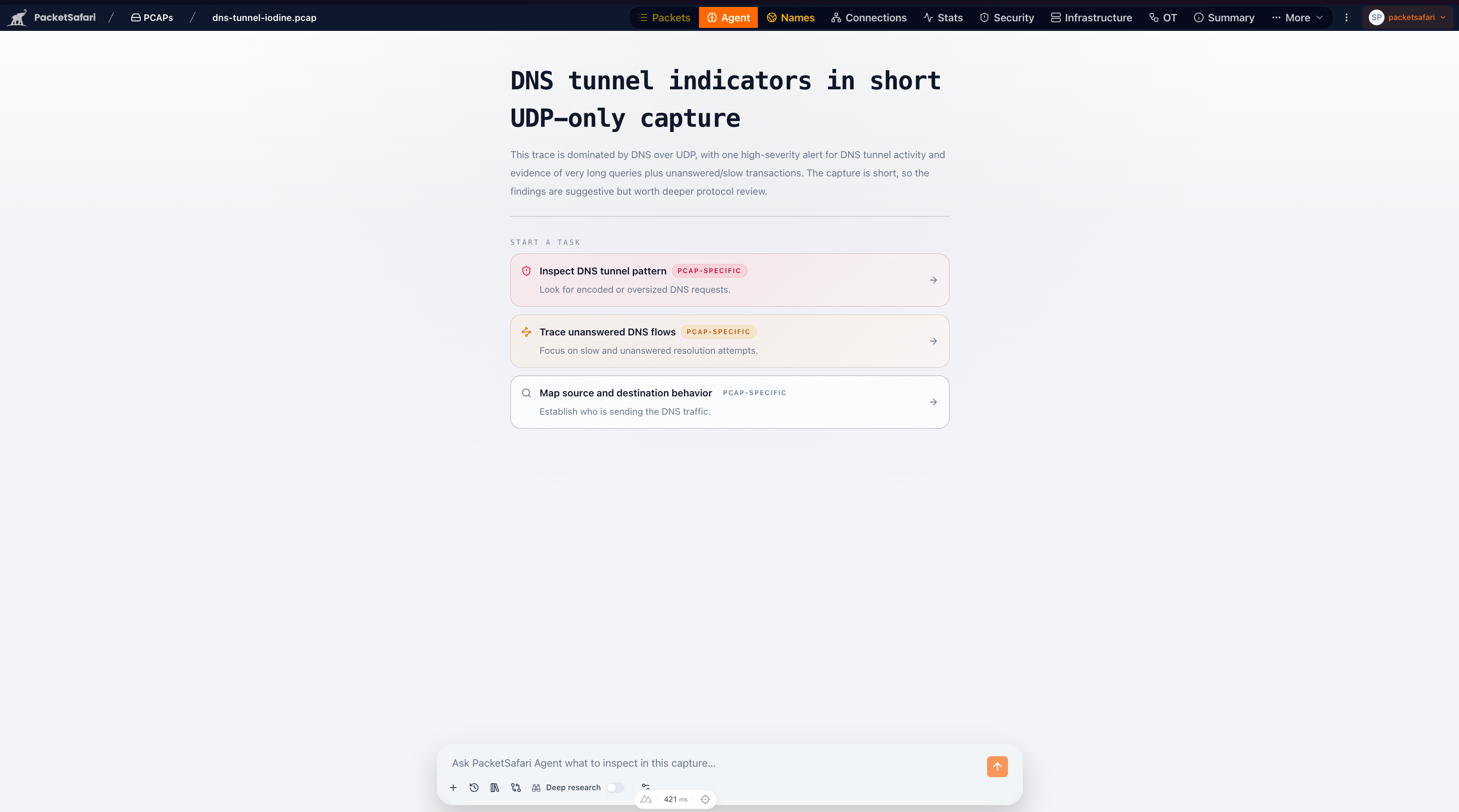
Use Agent when:
- you want to upload a PCAP and ask for an answer in one flow
- the first-pass brief suggests a real issue worth deeper review
- you want PacketSafari to drive the next steps instead of asking a back-and-forth chat
- you need a more structured investigation path than Quick Insights provides
Upload and ask AI
The fastest route into Agent is Ask AI in the upload dialog. Choose an Executive summary, Root cause, Security review, or Custom prompt, then choose how PacketSafari should balance first-result speed and capture-wide context:
- Fast + verification starts a focused preliminary Agent while PacketSafari Triage builds indexed evidence for a later independent verification follow-up. This is the recommended operational default.
- Fast answer starts one bounded preliminary Agent as soon as the capture is safely readable. It is fastest when the question includes a useful selector, but it may miss correlations elsewhere in the capture.
- Triage then deep waits for indexed rules, priority flows, protocol signals, and correlations before starting one deep Agent. It is the slowest path to the first report and the strongest capture-wide starting point.
See Investigation Path Guide for the full comparison. Manual inspection, guided Copilot, and Agent automation can all use the PacketSafari Core Engine; they describe who drives the investigation, not how much processing must finish before Agent starts.
When anoncap is enabled, Agent runs against the anonymized sibling capture. Where mail delivery and entitlement allow it, PacketSafari can email the preliminary report and later verification outcome as distinct persisted milestones.
Typical flow
- Start from Ask AI during upload, or review Quick Insights or your current analyzer context.
- Open Agent from the analyzer header when you are already inside the capture.
- Choose the investigation tier that fits the task.
- Add Case context when the capture has known symptoms, measurement points, or operational notes.
- Start one of the capture-specific tasks.
- Review the resulting findings and pivots, then continue in packets, stats, security, or infrastructure as needed.
- Use Generate report after a completed run when you need a comprehensive write-up that can be shared outside the live analyzer.
Investigation tiers
PacketSafari uses weighted Agent units instead of raw token credits. This keeps usage predictable while still letting heavier investigations consume more of the monthly allowance.
| Tier | Best for | Agent-unit use |
|---|---|---|
| Fast answer · Standard model | Focused autonomous preliminary investigation for normal troubleshooting. | 1 Agent unit. |
| Fast + verification | Preliminary report followed by independent evidence verification in the same investigation. | 2 Agent units. |
| Fast answer · Strongest model | Focused preliminary investigation on the strongest configured model profile. | 2 Agent units. |
| Triage then deep · Strongest model | Capture-wide discovery followed by deep investigation on the strongest configured model profile. | 4 Agent units. |
Hosted Agent Pro includes 50 Agent units per month. If the whole allowance is
used on one profile, that is up to 50 focused standard-model runs, 25 Fast +
verification or focused strongest-model runs, or 12 deep strongest-model runs,
with two units remaining, or any weighted mix.
The progressive Fast + verification upload workflow uses a fixed validated
progressive runtime profile, meters 2 Agent units once, and includes both the
preliminary pass and the later independent verification pass. The follow-up
reports its exact outcome; it is called verified only when verification
succeeds.
Enterprise allowances use the same weights. Shared Enterprise SaaS includes 500 pooled Agent units per month, Dedicated Enterprise SaaS includes 2,000, and On-Prem Enterprise includes 5,000 per licensed deployment. Normal SaaS users see the lane names above rather than provider model IDs.
Case context
Case context is optional text you can add before starting an Agent run. Use it for details that are not obvious from packets alone, such as where the trace was captured, what the user reported, which systems are expected to be involved, or what changed before the issue started.
Good context is short and operational:
Captured on the client side during a reported website timeout. The user can
reach other sites. Focus on whether the failure is local, policy-related, or a
server-side delay.
Agent uses this context to focus the investigation, but packet evidence remains the source of truth for findings.
Reports and exports
Agent can save a structured final report for a completed investigation. The report keeps the narrative answer, findings, evidence references, model/session details, and capture context together so the work can be reopened from the Agent stream or the shared AI Analyses history page.
Saved reports can be exported as HTML or JSON where report export is enabled. PDF export is tracked separately and is not required for the SaaS launch path.
The report export action is available from the focused report view after a report has been generated and saved. Deployments with configured mail delivery can also offer requested email delivery for the saved final report, subject to plan entitlement and consent rules.
Report watermarking
Every saved Agent report export includes provenance metadata intended to make resale, redistribution, or leak investigation easier. The watermark is included in JSON metadata and rendered into HTML exports.
Watermark metadata includes:
- report ID
- user ID
- organization ID when available
- capture ID and capture name
- generated timestamp and export timestamp
- deployment ID
- license ID
- deployment mode
- app version and build
- derived watermark ID
Watermarking is a traceability control, not encryption or DRM. It helps identify where an exported report came from, but it does not prevent an authorized viewer from copying text or screenshots.
When not to start with Agent
- Use Copilot if you want an interactive conversation.
- Stay in the packet list if you already know the exact filter or frame range you need.
- Use Raw-First Captures when a capture has been uploaded or migrated but PacketSafari Triage has not run yet. Agent can use Fast answer for bounded packet questions, but triage summaries and enriched trace tools are intentionally unavailable until processing completes.
Agent and Copilot results also appear in the shared AI Analyses history page.