
TLS Analysis Tools in 2026: What Each Tool Proves
 Oliver Ripka
The best TLS analysis tool depends on whether you need decrypted application content, handshake and transport evidence, continuous encrypted-traffic monitoring, or root-cause analysis for one failed connection. No tool can recover modern encrypted payload merely because it has the server certificate or a PCAP.
Start with the visibility available, then choose the tool.
This guide compares tools by what they can prove. For the commands to run in each situation, from a failed handshake to a fleet-wide certificate inventory, read TLS analysis solutions by scenario.
Quick comparison
| Tool | Strongest TLS role | Important boundary |
|---|---|---|
| Wireshark and TShark | Exact handshake, transport, field, byte, and decrypted application inspection | Modern decryption normally requires session secrets captured from an authorized endpoint or intermediary |
| Zeek | Structured TLS connection, version, server-name, certificate, and fingerprint metadata | It does not natively expose encrypted HTTP content and is not a frame-level workbench |
| Suricata | TLS metadata, signatures, anomalies, JA3/JA4 matching, and offline PCAP processing | Detection depends on configuration, rules, visible fields, and traffic coverage |
| Corelight | Continuous network evidence and encrypted-traffic detections in an enterprise NDR workflow | Product coverage and packet retention depend on the selected deployment |
| ExtraHop RevealX | Continuous protocol analysis, strategic decryption, records, NPM/NDR, and packet forensics | Decryption and Packet Forensics are features of a broader sensor platform |
| PacketSafari | Incident-specific TLS and transport RCA from a selected PCAP, with exact evidence and Verification | It can use only the packets, visible metadata, and authorized secrets supplied to the investigation |
What remains visible without decryption
Depending on TLS version, extensions, capture completeness, and features such as Encrypted ClientHello, a passive capture may expose:
- client and server addresses and ports
- TCP or QUIC connection timing
- TLS version negotiation
- ClientHello and ServerHello fields
- cipher and key-share information
- server name when not encrypted
- ALPN negotiation where visible
- certificate details in TLS versions and capture conditions that expose them
- alerts, resets, retries, and connection closure
- packet sizes, directions, timing, and transfer volume
- JA3, JA4, or related fingerprints derived from visible handshake features
TLS 1.3 encrypts more of the handshake than TLS 1.2. Zeek's TLS log documentation notes that certificate information is not passively visible in the same way for TLS 1.3. Encrypted ClientHello can further reduce name visibility.
This metadata can establish that a connection was attempted, negotiated, retried, reset, or delayed. It usually cannot reveal the encrypted request, response, command, or file.
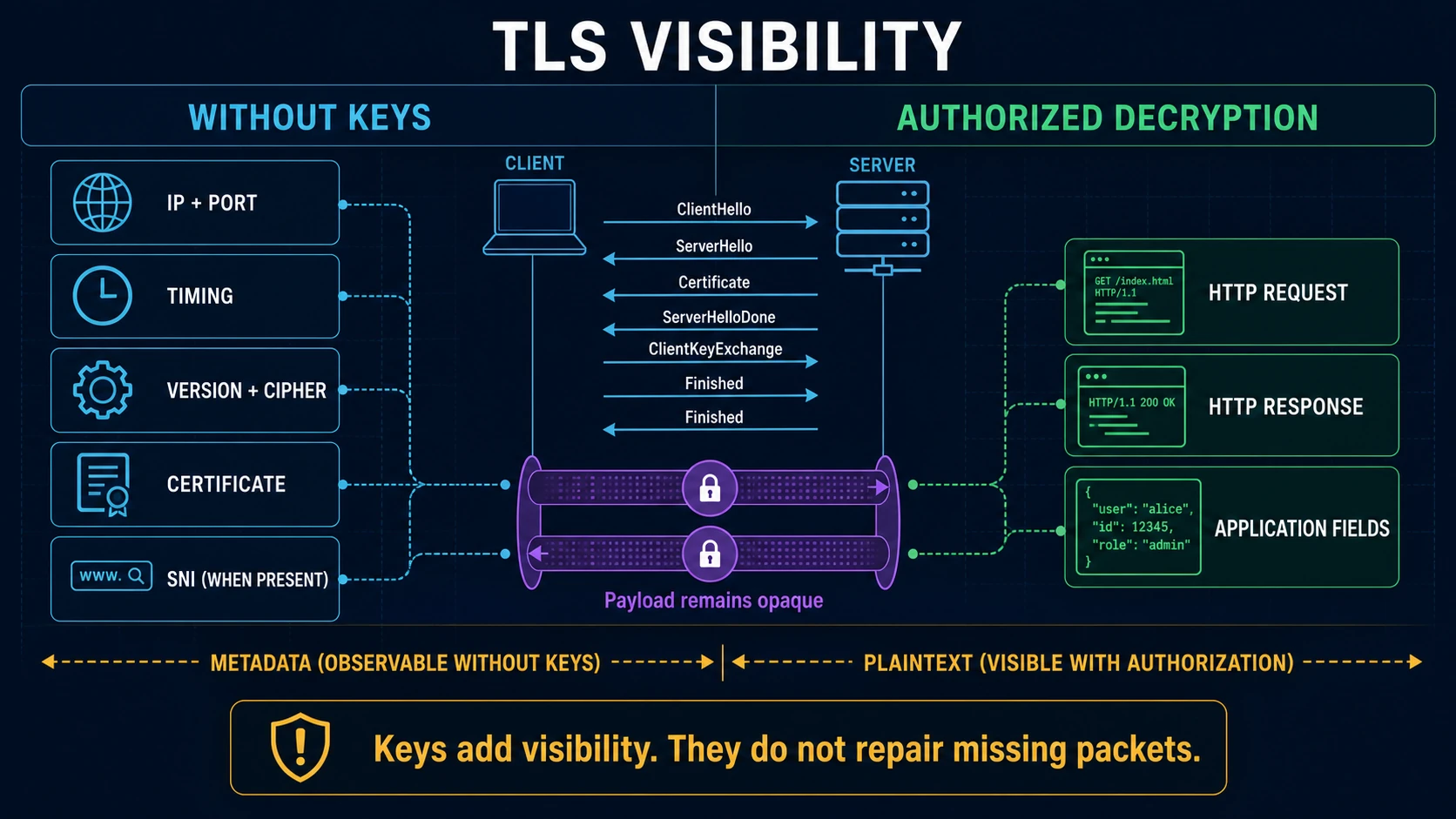
Authorized secrets add application visibility to a complete supported capture. They do not reconstruct packets that were never collected.
Wireshark and TShark: exact inspection and authorized decryption
Wireshark can decrypt TLS when appropriate secrets are available. The preferred modern method is a key log file containing per-session secrets from an authorized client, server, proxy, or controlled instrumentation.
An RSA private key works only in limited legacy conditions. It does not decrypt TLS 1.3 and does not work for TLS 1.2 sessions using ephemeral Diffie-Hellman key exchange. The certificate's public key is never enough.
Useful Wireshark filters include:
tls.handshake.type == 1
tls.handshake.type == 2
tls.alert_message
tls.handshake.extensions_server_name
tcp.flags.reset == 1
With valid session secrets, Wireshark can decode supported application protocols and reassemble content. Protect the key log and any PCAPNG containing embedded secrets like the underlying plaintext data.
Use Wireshark when exact packet order, disputed fields, reassembly, or payload-level validation matters. Use TShark when the same dissectors and secrets need to run in a repeatable command-line workflow.
Zeek: queryable TLS activity
Zeek records TLS properties in ssl.log and certificate details in related logs when visible. It can correlate the TLS connection with DNS, connection, file, and other application logs through a common connection identifier.
This is valuable for fleet-wide questions:
- Which TLS versions are still in use?
- Which names and certificates appear across the environment?
- Which connections failed to establish?
- Which client fingerprints are rare or newly observed?
- Which TLS sessions correspond to suspicious DNS or later traffic?
Zeek provides structured evidence and selectors. Retain or retrieve the PCAP when exact-frame verification will be required.
Suricata: detection and TLS fingerprints
Suricata can log TLS metadata and match rules against visible handshake properties, JA3, and JA4 fingerprints when the relevant features are enabled. It can process live traffic or PCAP files and correlate TLS events through EVE JSON.
Fingerprints are useful for hunting and correlation. They are not unique identities and should not be treated as malware verdicts. Browser updates, shared libraries, middleboxes, and custom clients can change or reuse them.
Validate a Suricata match against the original connection, rule logic, visible fields, endpoint role, and related behavior.
Corelight: encrypted-traffic evidence at NDR scale
Corelight builds encrypted-traffic analysis and detections on rich network evidence, including standards such as JA3 and Community ID. This fits teams that need continuous monitoring, correlation, and integration with a broader security stack.
Evaluate sensor placement, cloud and east-west coverage, packet retention, decryption boundaries, evidence export, and the method used to explain a detection. An encrypted-traffic alert should still lead to a reproducible session and packet context.
ExtraHop RevealX: decryption, records, and packet forensics
ExtraHop RevealX passively ingests network traffic, decodes application transactions, and combines NDR, performance monitoring, IDS, decryption, and packet forensics. Its deployment can provide continuous context that an isolated PCAP does not contain.
ExtraHop's packet documentation supports packet queries and downloads, including PCAP and authorized session keys under appropriate modules and privileges. Evaluate where decryption occurs, which protocols and cipher paths are supported, what data is retained, and how access to decrypted content is controlled.
PacketSafari: explain the failed TLS transaction
PacketSafari is designed for a selected incident capture rather than continuous TLS monitoring. It can correlate DNS, TCP setup, ClientHello, visible negotiation, alerts, resets, retransmissions, comparable successes, and application timing into a root-cause finding with exact packet evidence.
When authorized TLS secrets are available and supported, decrypted protocol evidence can join that investigation. When they are not, the report should state exactly which TLS and transport facts remain visible and where payload-level attribution stops.
This distinction matters. A reset immediately after ClientHello may be decisive for locating the failure phase even though the encrypted application request never exists in the trace.
How to evaluate TLS analysis tools
Use a representative test set:
- a successful TLS 1.2 connection with session secrets
- a successful TLS 1.3 connection with session secrets
- the same traffic without secrets
- a failed handshake with an alert
- a reset before application data
- a QUIC connection
- an incomplete or one-sided capture
Score each tool on:
- visible fields with and without secrets
- TLS 1.2, TLS 1.3, QUIC, and resumption behavior
- reassembly and missing-packet handling
- metadata and fingerprint search
- exact packet citation
- decryption-key access controls
- coverage and blind-spot reporting
- ability to distinguish observation from inference
The large-PCAP workflow explains how to find a sparse TLS failure in a much larger capture. For an incident-specific workflow, use PacketSafari Analyzer to compare the failed connection with successful baselines and verify the conclusion against exact frames.