
How to Analyze Large PCAP Files
 Oliver Ripka
To analyze a large PCAP file, inventory the whole capture first, use indexed or aggregated facts to find promising regions, and retrieve exact packets only after the search has a reason. Do not begin by opening every packet in a desktop interface or splitting the file into arbitrary chunks.
Large-capture analysis is a discovery problem. The decisive evidence may be one failed handshake, a periodic beacon, a short routing event, or a retransmission burst inside hours of ordinary traffic. The workflow must reduce volume without erasing the sequence that explains the incident.
Why arbitrary splitting is risky
Splitting a 200 GB capture into 1 GB files makes each file easier to open, but it can separate:
- DNS resolution from the connection it enabled
- authentication from the later application failure
- the first failed attempt from the successful retry
- a control-plane event from its data-plane consequence
- the original TCP segment from its retransmission
- command-and-control tasking from the follow-on action
File boundaries are storage decisions, not causal boundaries. Use them for processing when necessary, but preserve a capture-wide index and enough overlap or session context to reconstruct events across boundaries.
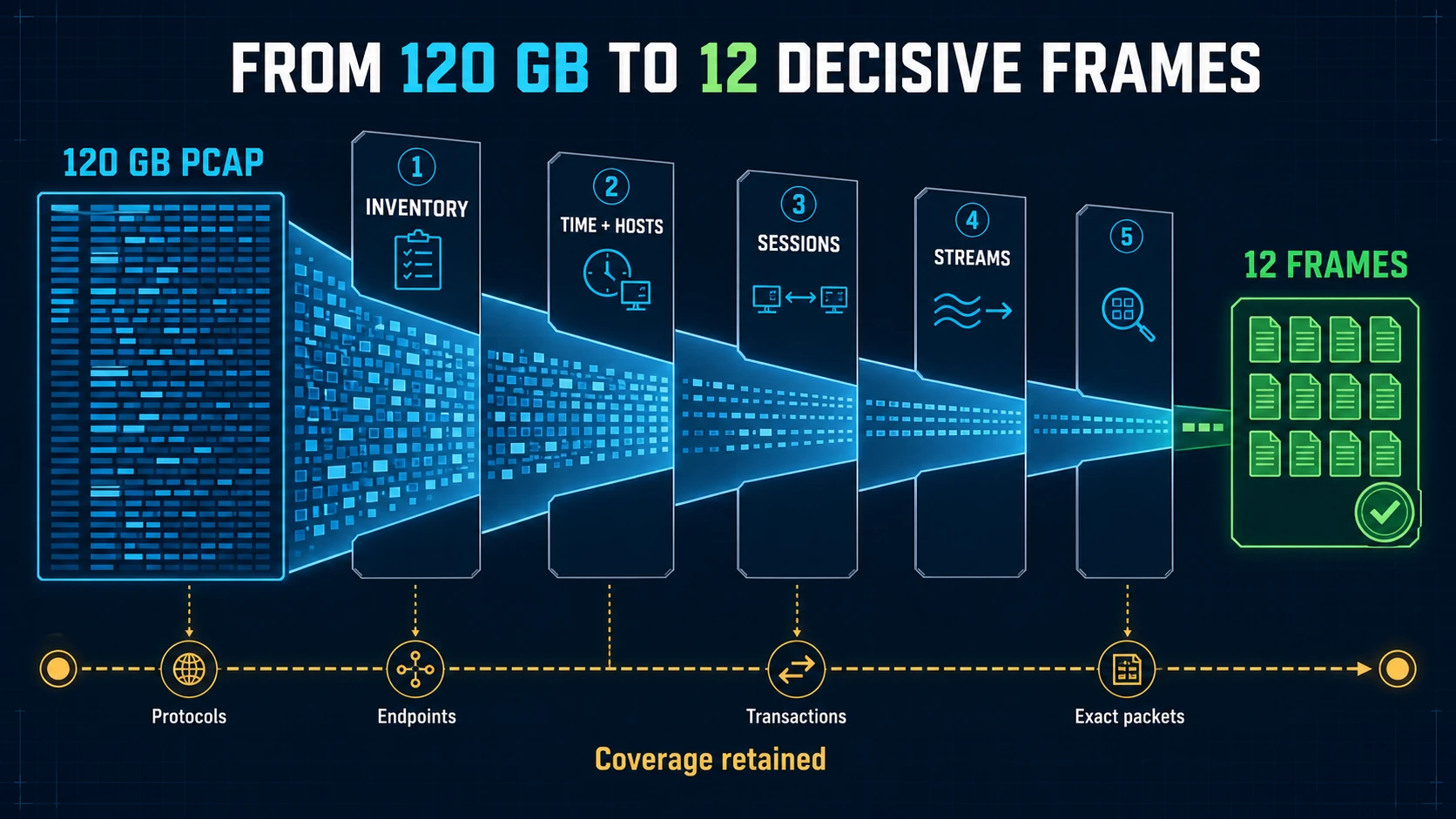
Good reduction preserves the route back to the complete capture. The final 12 frames are evidence because the investigation still records what was searched and excluded.
Start with file and capture metadata
Before deep processing, record:
- file format and size
- packet count and duration
- interfaces and encapsulations
- first and last timestamps
- average and peak packet rates
- snap length and packet slicing
- capture comments and name-resolution blocks
- reported drops per interface
- whether timestamps are ordered
Wireshark's capinfos provides a fast first summary:
capinfos large-capture.pcapng
If the file is PCAPNG with multiple interfaces, do not flatten their identity too early. Different interfaces may represent different capture points, directions, or link types.
Build capture-wide inventories without rendering every frame
Use command-line or indexed processing for summaries:
tshark -r large-capture.pcapng -q -z io,phs
tshark -r large-capture.pcapng -q -z endpoints,ip
tshark -r large-capture.pcapng -q -z conv,tcp
Depending on file size and protocol mix, these operations can still require substantial time and memory. Run them in a controlled environment and observe progress and resource use.
Capture-wide outputs worth retaining include:
- protocol hierarchy
- endpoint and conversation tables
- packet and byte rate over time
- connection outcomes and duration distributions
- DNS and TLS name inventories
- security alerts and protocol anomalies
- capture quality and decoder warnings
These summaries define the search space. They do not replace exact packet review.
Narrow from the incident facts
Use the reported symptom to form selectors:
- endpoint or subnet
- server name or DNS answer
- port and protocol
- transaction or call identifier
- TLS server name or fingerprint
- time window
- alert signature or flow ID
- known-good and affected capture points
If the incident time is uncertain, search progressively. Start with an hour, identify candidate conversations or spikes, then reduce to minutes and streams. Preserve why each narrowing decision was made.
A bounded extraction with TShark might look like:
tshark -r large-capture.pcapng \
  -Y 'ip.addr == 192.0.2.25 && tcp.port == 443' \
  -w scoped-service.pcapng
Confirm that the display filter retains all packets needed for the hypothesis. A filter focused only on one address may remove ICMP errors, name resolution, or a proxy connection that explains the failure.
Use session indexing when large captures are routine
Arkime parses network sessions, indexes rich fields in OpenSearch or Elasticsearch, and can retain and export standard PCAP. It is useful when analysts repeatedly need to search large retained traffic by addresses, names, fingerprints, protocols, or time windows.
Malcolm processes PCAP or Zeek logs into enriched OpenSearch data and Arkime sessions. Security Onion can pivot from alerts and hunts into retained packets.
These systems turn repeated full-file scans into indexed queries. They still need storage planning, sensor coverage, retention policies, access control, and operational ownership.
Find sparse signals without flattening the file into an AI prompt
A large PCAP does not belong in a language-model context window. Converting millions of packets into text creates a lossy, expensive summary and often removes timing, bytes, protocol structure, and negative evidence.
A safer AI-assisted workflow is tool-driven:
- deterministic processing inventories the capture
- detectors and queries identify candidate connections or time ranges
- the model asks bounded technical questions
- packet tools return exact fields, frames, and sequences
- the model tests alternatives
- a separate verification pass retrieves the supporting evidence again
The model reasons over selected evidence, not over a flattened imitation of the whole PCAP.
Preserve coverage while narrowing
Every reduction step should retain a coverage receipt:
- original file identity and hash
- original time range and interfaces
- processing completed or skipped
- filters and queries applied
- packet and byte counts before and after
- protocols or payload omitted
- decoder and tool versions where material
- extraction filenames and hashes
Coverage answers a critical question: did the analysis find no relevant evidence, or did it never examine the region where that evidence could exist?
Use sampling carefully
Statistical sampling can estimate traffic composition or packet-rate characteristics. It is dangerous for rare incident evidence. One packet in a million may be the only reset, ICMP error, exploit request, or routing update that explains the case.
Use sampling for questions that tolerate it, and label the result. Do not use a sampled absence to claim that a sparse security or root-cause event did not occur.
Open the final bounded evidence in Wireshark
Once the candidate sessions are small enough, use Wireshark for unrestricted validation:
- follow the complete stream
- inspect protocol state and decoded fields
- graph timing and sequence progress
- compare failed and successful transactions
- confirm analysis flags against packet order
- inspect bytes when a decode is disputed
The objective is not to avoid Wireshark. It is to spend expert attention on the packets that can change the conclusion.
PacketSafari large-capture investigation
PacketSafari Triage processes the capture to build a prioritized Evidence Map, while Agent can start from a bounded question and exact packet tools. For eligible captures and deployment profiles, the Full investigation workflow separates an early Fast Report from the later capture-wide Final Report, with independent Verification available as an optional follow-up.
File size, packet count, protocol mix, requested analysis, and runtime capacity all affect processing. PacketSafari does not claim unlimited capture size or one universal runtime. Qualify the representative capture and deployment during evaluation.
The packet evidence verification guide defines the proof that should survive the narrowing process. To test the workflow, use the same large capture and incident question across your command-line, indexing, manual, and PacketSafari large-capture paths.