
How to Find Malicious Traffic in a PCAP
 Oliver Ripka
To find malicious traffic in a PCAP, combine several weak and strong signals into one packet-grounded story. Start with capture quality, use signatures and metadata as leads, reconstruct the suspicious behavior, and verify the decisive claims against exact packets.
Do not stop at the first IDS alert, unusual domain, rare port, or periodic connection. Each can be benign. The analyst's job is to establish what the host did, how the behavior progressed, and which parts of the attack are visible or missing.
Start with the incident question and capture boundary
Security analysis improves when the question is specific:
- Did this host establish command-and-control communication?
- Was a suspicious executable transferred?
- Did the compromised endpoint move laterally over SMB or RDP?
- Was data sent to an external service after credential access?
- Does the PCAP support or contradict an endpoint alert?
Then record where the capture was taken. A north-south internet capture may show command-and-control traffic but miss east-west lateral movement. A branch SPAN may see SMB between local systems but not traffic routed through a different site. Encrypted payloads may hide commands while still exposing connection timing, TLS properties, and transfer volume.
Check both directions, drop counters, packet slicing, timestamps, and expected address ranges before drawing security conclusions.
Build a security-oriented traffic inventory
Inventory the capture before chasing individual alerts:
- internal and external endpoints
- protocols and unexpected ports
- DNS queries, answers, and failure rates
- TLS server names, versions, certificates, and fingerprints where visible
- HTTP hosts, methods, response types, and transferred objects where unencrypted
- SMB, Kerberos, LDAP, RDP, SSH, and remote-administration traffic
- ICMP, tunnels, repeated connection failures, and long-lived sessions
- upload and download byte patterns
Useful Wireshark starting filters include:
dns
tls.handshake.type == 1
http.request || http.response
smb2 || kerberos || ldap || rdp
tcp.flags.reset == 1 || icmp
These filters reveal surfaces, not verdicts. A TLS ClientHello shows an attempted encrypted connection. It does not prove the application completed or the traffic was malicious.
Use IDS alerts as selectors, not conclusions
Suricata can process PCAP files, apply signatures, parse protocols, log transactions, and extract files. That makes it an excellent first-pass source of security leads.
For each alert, capture:
- signature and category
- source and destination tuple
- flow identifier and timestamp
- packet or transaction that matched
- direction and application protocol
- related alerts on the same endpoints
Then inspect the surrounding packets. Determine whether the rule matched an exploit attempt, a successful response, a policy violation, a test string, or traffic that merely resembles the signature.
An alert on an HTTP request may establish an attempt. A subsequent response, file transfer, new process connection, or lateral session may be needed to support impact.
Correlate DNS, TLS, and application behavior
Malicious activity often becomes clearer across layers.
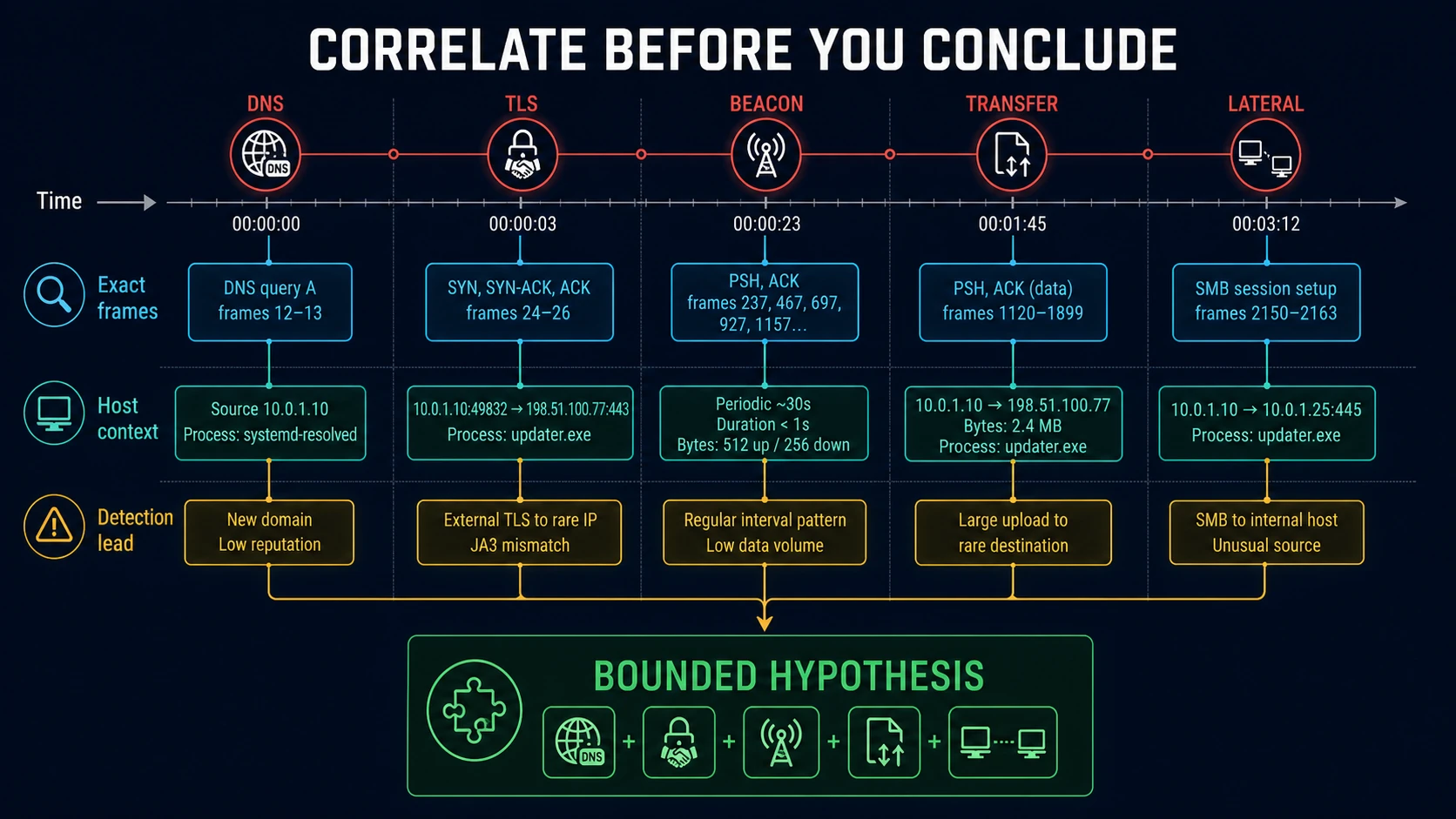
No single event proves the case. The bounded hypothesis becomes stronger when packet sequence, host context, and independent detection leads agree.
DNS
Look for newly observed or operationally unexpected names, high failure rates, many unique subdomains, algorithmic-looking labels, unusual record types, and answers followed by immediate connections. Do not call a domain malicious from appearance alone. Validate it with authoritative threat intelligence and the behavior in the trace.
TLS and QUIC
Inspect server name, version, certificate details where visible, ALPN, connection success, byte counts, timing, and client fingerprints. TLS 1.3 encrypts more handshake detail than earlier versions, and Encrypted ClientHello can hide the server name. QUIC carries TLS 1.3 over UDP and requires its own protocol view.
A JA3 or JA4-style fingerprint is a correlation key, not proof of malware. The same library can appear in legitimate and malicious software.
HTTP and cleartext protocols
When authorized payload is visible, inspect request paths, host headers, user agents, response types, redirects, file signatures, commands, and credentials. Reassemble transferred objects only in a controlled analysis environment. Treat extracted files as potentially hostile.
Test for command-and-control behavior
Beaconing is more than periodic traffic. A useful command-and-control hypothesis considers:
- repeated connections from the same endpoint to the same service
- a stable or slightly jittered interval
- small outbound requests followed by small or variable responses
- long idle periods between transactions
- retries after DNS or connection failure
- activity outside the endpoint's normal operating pattern
- protocol or certificate details inconsistent with the claimed service
- follow-on actions after a response
Compare the suspicious host with peers. A management agent, monitoring service, software updater, and real command-and-control channel can all create periodic connections.
The stronger finding is not “connections occur every 60 seconds.” It is “the host resolves this domain, establishes a repeated encrypted session with this timing and byte pattern, receives a response, and then initiates a new lateral connection.”
Reconstruct lateral movement and attack paths
For east-west traffic, look for a sequence rather than isolated ports:
- name resolution or directory lookup
- authentication attempt
- SMB tree connect, RPC endpoint mapping, WinRM, RDP, SSH, or another remote service
- file transfer or remote action
- response and result
- connection from the newly contacted host to another system
Relevant protocol filters may include:
kerberos || ldap || smb2 || dcerpc || rdp || ssh
Encryption and protocol signing can hide action details. The PCAP may support that an authenticated SMB session and file transfer occurred without proving execution on the remote host. Endpoint or server logs then become the next evidence source.
Validate transferred files and artifacts
NetworkMiner can parse PCAP files and reassemble transferred files and certificates. Wireshark can export objects for supported protocols. Zeek and Suricata can produce file metadata or extracted artifacts when configured.
For every recovered object:
- record the source flow and exact packet range
- calculate a cryptographic hash
- preserve the original in controlled storage
- identify the protocol and transfer direction
- distinguish full reconstruction from partial content
- analyze the file with an approved malware workflow
A malicious file hash supports the nature of the object. It does not by itself prove the endpoint executed it.
Build a packet-grounded incident timeline
An effective timeline might look like this:
| Time | Packet evidence | Interpretation |
|---|---|---|
| 10:14:02 | DNS query and answer for the selected name | Endpoint obtains destination address |
| 10:14:03 | TLS ClientHello and completed connection | Encrypted session is established |
| 10:14:04 | Small outbound transfer and larger response | Candidate tasking or content retrieval |
| 10:14:07 | SMB authentication and tree connect to a peer | Candidate lateral action begins |
| 10:14:09 | File transfer on the SMB session | Object moves to the peer |
The table is an illustration, not a universal attack pattern. Every row in a real report should point to exact frames or a reproducible selector.
State security coverage explicitly
A security conclusion should say what was examined:
- capture duration and vantage point
- endpoint and subnet coverage
- protocols decoded
- IDS rules and threat-intelligence sources used
- encrypted traffic limitations
- packet loss or slicing
- whether files, DNS, TLS, behavioral patterns, and lateral protocols were checked
This prevents “no alert found” from turning into “no malicious traffic exists.” The correct result may be no captured malicious behavior, suspicious but unverified, supported malicious activity, or inconclusive.
A practical tool chain
Use Zeek or Suricata to create structured leads, Arkime or Security Onion to retrieve the relevant sessions, NetworkMiner for artifacts, and Wireshark for unrestricted packet validation. The packet evidence verification standard explains how to preserve the handoff between those layers.
PacketSafari malicious-traffic analysis combines IDS, offline threat intelligence, behavioral C2, tunnel and lateral-movement analysis, exact packet evidence, and explicit coverage for a selected PCAP. It complements live NDR, EDR, and XDR systems. It is not a continuous monitor.
The reliable method is consistent across tools: treat detections as leads, reconstruct behavior across protocols, verify exact packets, and stop at the boundary of what the capture can prove.