
Best Packet Analysis Tools in 2026: 12 Compared
 Oliver Ripka
The best packet analysis tool is the one that matches the job in front of you. Capturing traffic, decoding one difficult stream, searching weeks of retained packets, detecting malicious behavior, and producing a reviewable root-cause report are not the same task.
That distinction matters because most lists mix command-line capture utilities, desktop analyzers, network security monitoring platforms, packet recorders, and AI-assisted investigation products as if they were interchangeable. They are not.
This comparison covers 12 tools that enterprise network and security teams are likely to encounter in 2026. It evaluates their best fit, what evidence they preserve, and the tradeoff a buyer should test with representative captures.
Quick comparison
| Tool | Best fit | Main tradeoff to evaluate |
|---|---|---|
| Wireshark and TShark | Expert packet decoding, filtering, statistics, and manual validation | The analyst normally owns discovery, correlation, interpretation, and reporting |
| tcpdump and dumpcap | Focused packet capture close to the affected system | Capture and filtering are the job, not a complete investigation workflow |
| Zeek | Structured network activity logs and programmable network security monitoring | It is not a frame-level packet workbench or a PCAP repository |
| Arkime | Large-scale session indexing, search, retained packets, and PCAP export | Analysts still need a method for causal interpretation and final reporting |
| Suricata | IDS, IPS, network security monitoring, protocol logs, and offline PCAP inspection | A signature or anomaly event is a lead, not automatically the incident conclusion |
| Security Onion | Integrated alerts, metadata, hunting, cases, and full-packet workflows | It is a security monitoring platform that requires sensor and storage operations |
| NetworkMiner | Host discovery and extraction of files, certificates, credentials, and other artifacts | Artifact extraction is narrower than general performance or root-cause analysis |
| Corelight | Enterprise NDR built around rich network evidence and detections | Platform fit, sensor coverage, raw-packet retention, and licensing need deployment-specific validation |
| ExtraHop RevealX | Continuous NDR, NPM, transaction records, decryption, and packet forensics | Packet Forensics is part of a broader sensor platform, not a standalone upload analyzer |
| Omnipeek | Windows-based packet analysis, performance, Wi-Fi, voice, video, and distributed capture | Best value appears when its capture engines and specialist workflows match the environment |
| NETSCOUT nGeniusONE | Continuous service assurance, application performance, session analysis, and packet capture | It is an observability estate rather than a lightweight post-capture tool |
| PacketSafari | Vendor-neutral PCAP investigation, exact evidence, Verification, and report handoff | It starts after capture and does not replace a TAP, packet broker, recorder, or continuous NDR |
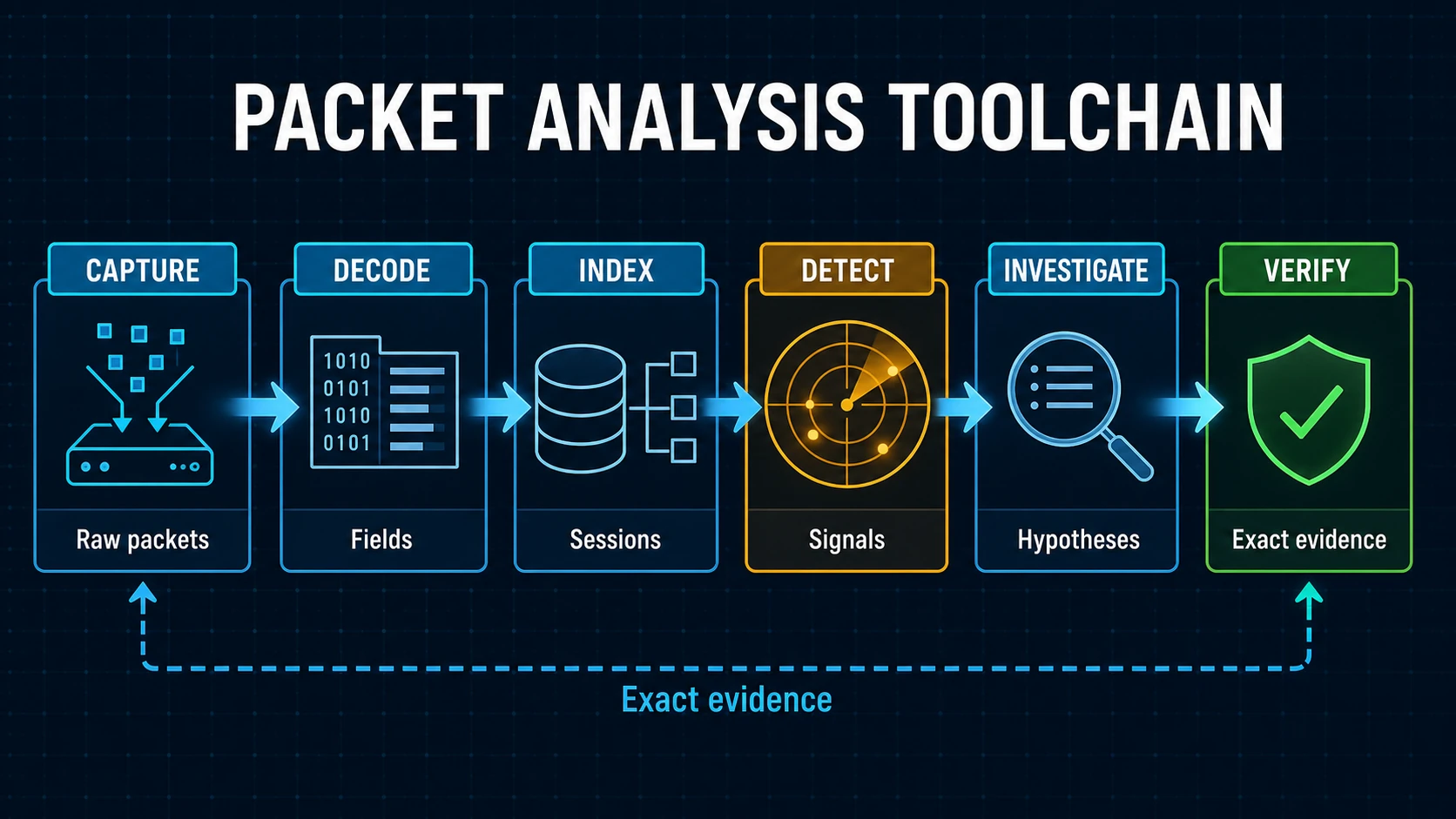
A useful comparison places each product at the stage it actually performs. Exact packet evidence remains the path for checking results produced upstream.
Capabilities and packaging change. Treat this as a shortlist, then verify the current vendor documentation and test the same captures in every serious candidate.
First decide which job you need to do
Before comparing products, write down the output the team actually needs:
- Acquire packets. Capture a bounded event without dropping or truncating the evidence.
- Inspect exact packets. Decode fields and bytes, follow streams, graph timing, and apply display filters.
- Search retained traffic. Find relevant sessions across a long time window and export a defensible subset.
- Detect suspicious behavior. Apply signatures, protocol analysis, threat intelligence, and behavioral logic.
- Extract artifacts. Recover files, certificates, host details, credentials, or transferred objects where authorized.
- Explain an incident. Correlate symptoms and competing hypotheses into a conclusion with limitations.
- Hand off the answer. Preserve exact evidence, coverage, uncertainty, and recommended next checks.
Few tools lead in all seven. A mature workflow often combines two or three.
Wireshark and TShark: the reference workbench
Wireshark remains the reference interactive protocol analyzer. It opens many capture formats, decodes a broad protocol set, filters on decoded fields, follows streams, exposes expert information, and provides detailed statistics and TCP graphs. TShark brings the same dissector ecosystem to command-line processing and repeatable extraction.
Choose Wireshark when an experienced analyst needs unrestricted control over packets and edge cases. Keep it available even when an automated product performs the first pass. Exact-frame validation is where Wireshark is hardest to replace.
The tradeoff is analyst effort. Wireshark shows evidence very well, but it does not inherently know the incident question, rank all competing explanations, or produce a verified report. On a large unfocused capture, finding the decisive stream can be most of the work.
tcpdump and dumpcap: capture first
tcpdump is the practical command-line choice on many Unix-like systems. Wireshark's dumpcap is a dedicated capture utility with capture filters, ring buffers, file rotation, and stop conditions.
These tools are strong when the problem is acquiring a focused trace close to a client, server, container, or network interface. They are small enough to use where a graphical analyzer is inappropriate.
Do not judge them as weak investigation platforms. Investigation is simply not their primary job. Record the interface, capture filter, snap length, time source, drop counters, and capture position, then hand the resulting PCAP or PCAPNG to the next tool.
Zeek, Suricata, and Security Onion: turn traffic into security evidence
Zeek passively converts traffic into structured logs describing connections and application activity. Its scripting model is valuable when a security team wants durable, queryable network facts and organization-specific analysis. Zeek's own documentation is explicit that it is not a frame-level analyzer like Wireshark and is not a system for storing traffic as PCAP.
Suricata combines IDS, IPS, and network security monitoring. It can process live traffic or PCAP files, generate EVE JSON events, parse application protocols, extract files, and record traffic. It is an excellent source of leads, but the presence of an alert does not establish the full incident scope or root cause.
Security Onion integrates Suricata detections, Zeek or Suricata metadata, hunting, dashboards, cases, and full-packet retrieval. Choose it when the goal is an operated network-security monitoring environment, not merely opening one capture on demand.
Arkime and NetworkMiner: find sessions or recover artifacts
Arkime indexes network sessions and can retain full packets in standard PCAP form. An analyst can search rich session fields, pivot through related traffic, inspect packet data, and export a selected PCAP. This makes Arkime a strong bridge between continuous collection and a bounded incident investigation.
NetworkMiner takes a different angle. It parses captures to discover hosts, sessions, hostnames, open ports, certificates, and transferred files. That is useful in malware analysis and network forensics, especially when the artifact itself matters.
Neither role should be reduced to a generic “PCAP viewer.” Arkime answers where the relevant packet record is. NetworkMiner helps recover what moved across it.
Corelight and ExtraHop: enterprise network evidence platforms
Corelight builds an enterprise NDR platform around Zeek-derived network evidence, Suricata-powered detections, file analysis, packet capture options, and investigation workflows. It is strongest when the organization needs continuous network visibility and detection integrated with a wider security stack.
ExtraHop RevealX combines NDR, network performance monitoring, IDS, transaction records, decryption, and optional packet forensics. Its Packet Forensics documentation describes continuous packet capture, search, an integrated viewer, and file carving. That is a materially broader deployment than uploading an isolated PCAP.
For both platforms, ask where sensors are deployed, which traffic is decrypted, what packet retention is licensed, how blind spots are measured, and how a finding is exported for independent review.
Omnipeek and NETSCOUT: packet-led performance operations
Omnipeek combines packet capture and analysis with expert events, visualizations, Wi-Fi troubleshooting, voice and video analysis, and distributed capture engines. It deserves attention when those specialist network-performance workflows are central.
NETSCOUT nGeniusONE uses packet-derived Smart Data from InfiniStreamNG and vSTREAM appliances for continuous service assurance, application and session analysis, voice and video visibility, and on-board packet capture. It fits an enterprise observability program more naturally than a one-off analyst workstation.
Their strength is persistent operational context. The corresponding evaluation question is whether the organization needs that estate, or already has the PCAP and needs a focused explanation.
PacketSafari: investigation after capture
PacketSafari Analyzer starts with a PCAP or PCAPNG from any authorized capture point. Its Core Engine and Triage workflow prepare capture-wide signals and an Evidence Map. Agent then uses bounded packet tools to investigate a question, cite exact packet evidence, and separate preliminary direction from independent Verification.
PacketSafari is designed for root-cause, malicious-traffic, performance, large-capture, and unfamiliar-protocol investigations where another analyst must be able to review the conclusion. Material findings can retain frames, filters, streams, timestamps, decoded fields, coverage, alternatives, and uncertainty.
It is not a capture appliance, continuous monitor, or replacement for Wireshark's unrestricted manual inspection. A common workflow is to capture with tcpdump, retrieve with Arkime or Security Onion, investigate with PacketSafari, and validate a difficult edge case in Wireshark.
How to run a fair evaluation
Use representative captures, not a vendor demo alone. Include one easy case, one ambiguous case, one large capture with sparse decisive evidence, and one capture that should end inconclusively.
Score each candidate on:
- Capture integrity: Can it state what traffic was observed, missed, truncated, or dropped?
- Evidence precision: Can a material claim point to exact packets or reproducible selectors?
- Coverage: Does the result explain what was and was not examined?
- Competing explanations: Can the workflow test and reject plausible alternatives?
- Scale behavior: What happens when the important exchange is late and rare?
- Privacy and deployment: Where do packets, extracted data, and model inputs go?
- Handoff: Can another analyst reproduce the answer without trusting the original operator?
The honest winner may be a combination. Choose the smallest stack that captures the right traffic, finds the relevant evidence, and returns an answer your team can defend.
To evaluate the post-capture investigation layer, run PacketSafari with a representative capture and compare its cited evidence with your existing Wireshark, recorder, or NDR workflow.