
AI PCAP Analyzer Tools Compared
 Oliver Ripka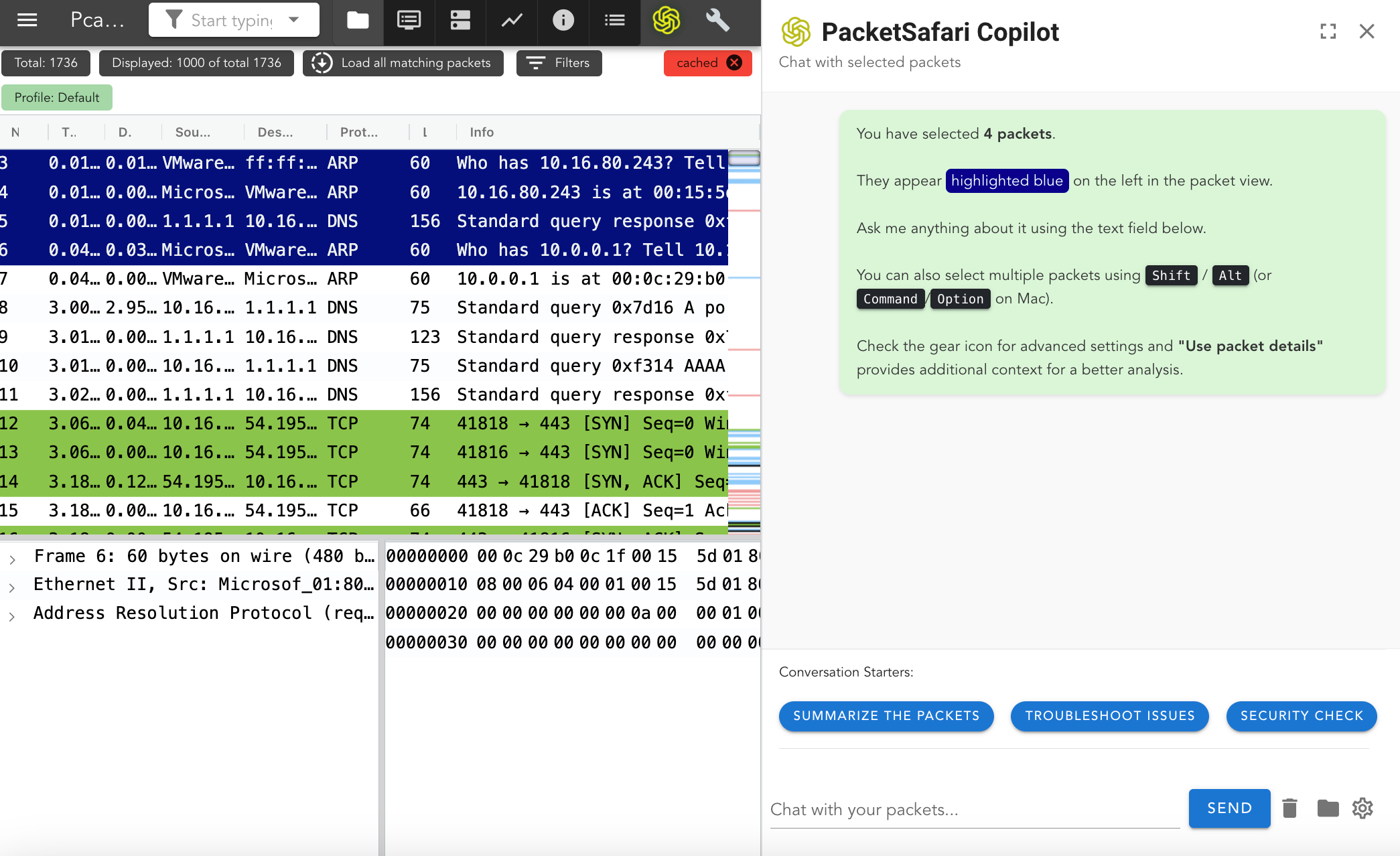
Choosing a packet-analysis tool is less about finding one universal winner and more about matching the tool to the investigation. Capturing traffic, exploring packets manually, generating an automated security report, diagnosing a Wi-Fi failure, and producing a defensible root-cause analysis are different jobs.
This guide compares traditional packet tools with current AI-assisted PCAP analyzers using five practical questions:
- Where did the capture come from?
- Is the goal exploration, detection, or root-cause analysis?
- How large and unfocused is the capture?
- Must raw packet data remain inside a controlled boundary?
- Can another analyst reproduce the conclusion from exact packet evidence?
Quick comparison
| Tool | Best fit | Main tradeoff |
|---|---|---|
| Wireshark | Deep manual packet inspection and protocol decoding | Requires analyst time and expertise |
| tcpdump / dumpcap | Lightweight capture and command-line filtering | Limited investigation and reporting workflow |
| PacketSafari | Vendor-neutral, evidence-backed PCAP root-cause analysis with SaaS and on-prem paths | Not a packet-capture appliance or vendor operations console |
| Cisco Meraki AI PCAP Analyzer | Supported Meraki Wi-Fi failures with native Dashboard context | Focused on the Meraki estate rather than arbitrary PCAP workflows |
| PcapAI | Automated web-based security analysis and report generation | Fit depends on the required analysis depth, retention policy, and evidence workflow |
| logcat.ai PCAP Analyzer | Direct AI-assisted upload and packet-cited answers | A focused analyzer rather than a complete enterprise capture lifecycle |
| Teleseer | Browser-based network mapping and large-capture exploration | Visualization and discovery are the primary workflow |
| Allegro Network Multimeter | Appliance capture, high-speed metadata, filtering, and extraction | Hardware-centered workflow rather than an AI-led RCA report path |
Public capabilities change, so verify the vendor documentation and test representative captures before making a production decision.
Wireshark: the manual protocol workbench
Wireshark remains the reference desktop tool for decoding and inspecting packets. It is the right choice when an analyst needs complete interactive control over display filters, streams, decoded fields, expert information, graphs, and packet bytes.
Its strength is also its constraint: Wireshark presents the evidence but normally leaves the investigation plan, correlation, interpretation, and report writing to the analyst. Large or unfamiliar captures can require substantial time before the decisive flow or frame range is found.
Use Wireshark when:
- an experienced analyst wants direct packet-level control
- the capture is already focused enough to inspect manually
- desktop processing is acceptable
- the investigation does not require a shared, persisted AI workflow
tcpdump and dumpcap: capture first
tcpdump and Wireshark's dumpcap are excellent for collecting traffic with low overhead and applying capture filters close to the source. They are capture tools first, not complete investigation systems.
Use them to obtain a bounded PCAP, then move that capture into Wireshark, PacketSafari, or another analysis system. This separation matters: the best tool for collecting packets is not automatically the best tool for explaining an incident.
Cisco Meraki AI PCAP Analyzer: native Wi-Fi context
Cisco Meraki AI PCAP Analyzer is strongest when the affected clients, access points, failure telemetry, and packet capture already live inside a supported Meraki workflow. Cisco can combine packet exchanges with estate context and suggested actions for failures such as authentication timeouts or certificate problems.
That makes it a strong Meraki operations feature. It is not positioned as a vendor-neutral destination for arbitrary captures from unrelated enterprise, telecom, OT, cloud, or application environments.
Automated web analyzers: PcapAI and logcat.ai
PcapAI presents a focused upload-to-report workflow covering security findings, performance symptoms, MITRE ATT&CK mapping, downloadable reports, and API integration. logcat.ai PCAP Analyzer emphasizes whole-capture profiling, plain-language answers, and packet-cited findings.
These products are worth evaluating when fast automated web analysis is the primary requirement. Before uploading production captures, confirm file-size limits, deletion and retention behavior, model-provider routing, evidence granularity, and whether the report can be independently reproduced.
Teleseer and Allegro: exploration and capture infrastructure
Teleseer focuses on browser-based network visualization, asset discovery, threat insights, and exploration of very large captures. Allegro Network Multimeter combines appliance capture, fast metadata, filtering, replay, and reduced-PCAP extraction.
These tools are compelling when network mapping, high-speed capture infrastructure, or interactive packet exploration is the central problem. An organization may still use a separate RCA or reporting layer for a specific incident.
PacketSafari: evidence-backed, vendor-neutral RCA
PacketSafari Analyzer combines familiar packet inspection with PacketSafari Triage, bounded packet tools, Copilot, and Agent workflows. The objective is not merely to summarize a PCAP. It is to turn an investigation question into findings that another analyst can inspect against exact frames, filters, streams, timestamps, decoded fields, and bytes.
PacketSafari is designed for investigations where:
- the PCAP may come from any vendor or capture point
- a large capture must be narrowed without flattening it into an AI prompt
- preliminary direction and later verification must remain distinct
- the report must preserve evidence, alternatives, and uncertainty
- sensitive traffic requires anonymization, controlled model routing, or on-premises deployment
- security and network-performance causes may overlap
PacketSafari does not replace a TAP, packet broker, Meraki Dashboard, or high-speed capture appliance. It fits after capture, where the team needs a defensible explanation and a reusable investigation record.
How to evaluate an AI PCAP analyzer
Run every candidate against the same representative captures and score the result on more than whether the answer sounds plausible.
Evidence quality
- Does every material conclusion cite specific packets, flows, timestamps, or decoded fields?
- Can an analyst reproduce the finding with a display filter or packet pivot?
- Does the tool distinguish observed fact from inference?
Investigation reliability
- Does it test competing explanations?
- Can it say that the capture is inconclusive?
- Does a later verification step adopt, qualify, or rebut preliminary findings?
Capture scale
- What happens when the decisive evidence is sparse and late in a large capture?
- Is processing bounded, resumable, and observable?
- Are file-size and runtime statements validated for the intended deployment profile?
Privacy and deployment
- Where are raw packets stored?
- Which data reaches an AI provider?
- Can captures be anonymized without destroying diagnostic truth?
- Are private-model and on-premises paths available when required?
Operational handoff
- Can the investigation be resumed and reviewed by another analyst?
- Does the report preserve evidence and uncertainty?
- Can the result support an escalation, incident record, or customer-facing explanation?
Which tool should you choose?
- Choose Wireshark for expert-led manual inspection.
- Choose tcpdump or dumpcap for lightweight packet collection.
- Choose Cisco Meraki AI PCAP Analyzer for supported failures inside a Meraki Wi-Fi estate.
- Evaluate PcapAI or logcat.ai for a focused automated upload-and-report experience.
- Choose Teleseer or Allegro when mapping, exploration, appliance capture, or high-speed metadata is primary.
- Choose PacketSafari when arbitrary or sensitive captures need vendor-neutral, evidence-backed RCA and a controlled SaaS or on-premises workflow.
For a capability-by-capability view, see the AI PCAP analyzer comparison. To inspect the product directly, open PacketSafari Analyzer or explore the PacketSafari Agent.